Creating a mini calendar inside an excel spreadsheet
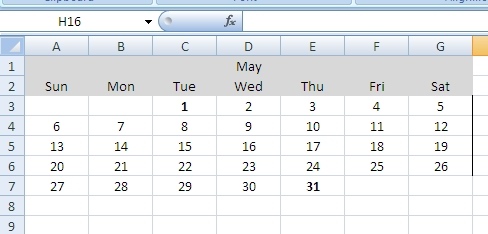
Whilst creating various turn-around-time reports, I thought it would be helpful to add a little calendar to the spreadsheet. Here is an excel vba function that adds a mini calendar to the cell address you specify:
 Public Function MakeCalendar(intStartRow As Integer, intStartCol As Integer, strStartDate As String, strEnddate As String) As Boolean
    'Takes start row and column and prints a calendar. By Eric Ainsworth - www.synapsonic.com
    On Error GoTo Errorhandler
    Dim WeekDays() As String 'little array for S-Sat
    WeekDays = Split("Sun,Mon,Tue,Wed,Thu,Fri,Sat", ",")
    Dim intX As Integer
    Dim intY As Integer
    Dim intCals As Integer
    Dim strMonth As String
    Dim intRow As Integer
    Dim intDay As Integer
    Dim intMonths As Integer
    If Month(strStartDate) = Month(strEnddate) Then
        'Same month
        intMonths = 1
    Else
        ‘Only set up to handle 2 months here.
        intMonths = 2
    End If

    For intCals = 1 To intMonths 'just once if same month
        If intCals = 1 Then 'first month
            strMonth = Month(strStartDate)
        Else
            strMonth = Month(strEnddate)
        End If

        If intCals > 1 Then 'move everythuing over to right
            intStartCol = intStartCol + 7
        End If

        For intY = LBound(WeekDays) To UBound(WeekDays)
            Cells(intStartRow + 1, intStartCol + intY).Value = WeekDays(intY)
            If intY = 3 Then 'put month
                If intCals = 1 Then
                    Cells(intStartRow, intStartCol + intY).Value = Format(strStartDate, "mmm")
                Else
                    Cells(intStartRow, intStartCol + intY).Value = Format(strEnddate, "mmm")
                End If 'end if intcals
            End If 'end if wed

            Range(Cells(intStartRow, intStartCol + intY), Cells(intStartRow + 1, intStartCol + intY)).Select
            Selection.HorizontalAlignment = xlCenter
            With Selection.Interior
                .Pattern = xlSolid
                .PatternColorIndex = xlAutomatic
                .ThemeColor = xlThemeColorDark1
                .TintAndShade = -0.149998474074526
                .PatternTintAndShade = 0
            End With
        Next intY 'next weekday

        intStartRow = intStartRow + 1

        intRow = 0
        For intX = 1 To 31 'day of month
            If Not IsDate(strMonth & " " & Format(CStr(intX), "00") & " " & Year(strStartDate)) Then
                Debug.Print "MakeCalendar: Last day of month " & strMonth & " was: " & intX - 1
                'Debug.Print strMonth & " " & Format(CStr(intX), "00") & " " & Year(strStartDate) & " not a date"
                Exit For
            End If

            intDay = Weekday(strMonth & " " & Format(CStr(intX), "00") & " " & Year(strStartDate)) 'as it is this will break over new years

            Cells(intStartRow + intRow + 1, intDay + intStartCol - 1).Value = intX
            Cells(intStartRow + intRow + 1, intDay + intStartCol - 1).HorizontalAlignment = xlCenter

            If DateDiff("d", strMonth & " " & Format(CStr(intX), "00") & " " & Year(strStartDate), strStartDate) = 0 Or DateDiff("d", strMonth & " " & Format(CStr(intX), "00") & " " & Year(strStartDate), strEnddate) = 0 Then
                Cells(intStartRow + intRow + 1, intDay + intStartCol - 1).Font.Bold = True
            End If

            'Columns(intDay + intStartCol - 1).EntireColumn.AutoFit 'cant do this it messes up stuff above

            Select Case intDay
                Case 1 'sunday
                    Cells(intStartRow + intRow + 1, intDay + intStartCol - 1).Borders(xlEdgeLeft).LineStyle = xlContinuous
                Case 2 'monday
                Case 3
                Case 4 'wed
                Case 5 'thur
                Case 6 'fri
                Case 7 'sat
                        Cells(intStartRow + intRow + 1, intDay + intStartCol - 1).Borders(xlEdgeRight).LineStyle = xlContinuous
                        intRow = intRow + 1
            End Select

        Next intX 'next day

        intStartRow = intStartRow - 1
    Next intCals 'next calendar

    Exit Function
Errorhandler:
    Debug.Print Err.Description & " " & Err.Number
    Resume Next
End Function
This is how you would call it:
Public Sub Test()
    Debug.Print MakeCalendar(1, 1, "5/1/2012", "5/31/2012")
End Sub